Ann Arbor Web Design Company
Build awareness and generate leads through smarter web design and digital marketing
See how 3.7 Designs can help you find and convert more prospects into leads, customers, and members through smarter design thinking and our exclusive web design and digital marketing process.
3.7 designs has been featured in






What we do
We design and develop custom websites with an emphasis on four key factors
Engagement
We’ll craft you a stunning and easy-to-use website that your audience loves and tells your unique brand story. You’ll stand out from your competitors.
Thoughtfulness
Every decision is made with intention. We’ll guide you every step of the way to ensure we hit your goals.
Awareness
A website that no one visits benefits no one. We’ll put you in front of your target audience through search engine optimization, pay-per-click, and digital marketing.
Results
You need a return on your investment. Every website we design is crafted with your goals in mind, ensuring we meet and exceed them.

Why digital is important
An effective website is no longer optional; it's a requirement.
The modern buyer’s journey is dramatically different than it was even five years ago. Today, people love to buy but hate to be sold.
Customers spend more time researching purchase decisions online. According to Forrester Research, [two-thirds or 67%] of buying decisions are now made online and via social media – before buyers speak to suppliers. Your prospects are becoming experts first, and only then speaking with you.
To speak with you, customers have to find you. If your website is not visible online, they’ll have a harder time knowing about you. We create mobile- and user-friendly websites that convey your brand personality, show up prominently in search, and generate qualified leads. Because today, an effective website isn’t a “nice to have”, it’s a must have.
Strategic Approach to Web Design
The difference between average and exceptional is the strategy.
Strategic web design looks at two sides of the same coin, how to approach marketing to deliver business results and provide value to your target audience. Identifying the overlap of what you want and what your audience wants is why our campaigns perform better.
We look for high-leverage opportunities to produce results two, three or 10 times greater from your marketing investment.
Outcomes like these are only achieved through a long-term vision and partnership. Instead of a “one-and-done” approach, we’ll work closely with you to create, monitor, analyze, and constantly improve your website efforts. Through this process, we’ve helped clients increase leads by as much as 1,500% per month!
Business Outcomes We’ve Delivered
7,900%
Increase in Leads
After launching their new website and digital marketing campaign, Insulgard’s leads increased from one per month to over 80.
400%
Increase in Search Traffic
Our content marketing campaign boosted Polymershapes’ organic monthly visitors from 5,000 to 25,000.
500%
Increase in Conversion Rate
After redesigning their website, ETA’s conversion rate increased from 0.5% to 3%.
$700k
in online sales
After launching an eCommerce platform, one of our biotechnology clients increased their revenue by $700,000.
Our Capabilities
We can help you succeed at any stage of your marketing journey.
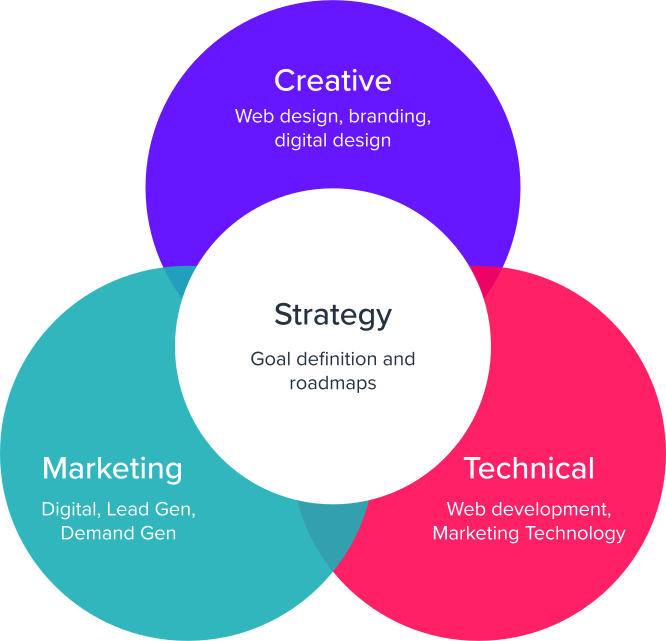
3.7 Designs stands out with its unique combination of strategic planning, creative design, and technical proficiency. This blend allows them to deliver comprehensive and innovative solutions that meet a wide range of client needs.
Digital Strategy
Web Design
Web Development
Digital Marketing
Case Studies
Client Successes in Technology
We specialize in solving common problems by providing tailored solutions that meet each client’s unique needs.
Polymershapes
Industry leading plastics distributor needs inbound marketing overhaul
75%
Increase in leads
100%
Increase in search traffic
285%
Increase in search visibility
Insulgard
Designing the way to smarter architectural security solutions
1000%
Increase in leads
400%
Increase in organic traffic
50%
Higher conversion rate than industry avg.
The Inovo Group
Innovation consulting firm strides boldly into the unknown
1200%
Increase in leads
750%
Increase in avg. time on site
200%
Increase in organic search traffic
Engineering Technology Associates, Inc.
Building a Winning Website (And Inbound Marketing Strategy) From Scratch
293%
Increase in Organic Search Traffic
2,00%
Increase in Leads
400%
Increase in Conversion Rate
Featured Clients
We’ve helped clients like these solve complex web design, marketing, and technology problems.




Get in touch
Discover how we can propel you towards your goals.
We’ve guided countless clients to achieve their goals and become heroes, and we’re excited to do the same for you. Ready to kick things off?